


When the NBN speed upgrades rolled out in late 2025, it was a good reminder that the router sitting inside your home matters more than people think.
Routers are often treated as something you set up once and forget about, but faster internet plans, more connected devices and regular security updates mean they play a much bigger role in day-to-day performance than they used to.
That’s where the Eero Pro 7 comes in.
Amazon’s latest Wi-Fi 7 mesh router is designed to keep up with faster NBN plans while staying simple enough to manage without needing to think too much about networking.
Essentials
- Price: $529.99 AUD (single) / $1,199.99 AUD (3-pack)
- Wi-Fi standard: Wi-Fi 7
- Coverage: Up to 190m² per node
- Ports: 2 Ethernet ports
- Smart home: Matter, Thread and Zigbee support
- Setup: App-based installation and management
- Extras: Optional Eero Plus subscription
Living With It
My apartment is only 43m², so in pure coverage terms, a single Eero Pro 7 is already overkill.
But coverage is only part of the equation.
I was mainly looking for a stable network across multiple devices, including laptops, tablets, gaming consoles and smart home gear. I also wanted something that would stay relevant for years as faster NBN plans and Wi-Fi 7 devices become more common.
Setup is one of the Eero system’s biggest strengths.
Everything happens through the Eero app. Plug in the router, open the app, and it walks you through the entire process step by step.
There’s no digging through browser menus or logging into a router using an IP address just to change a setting.
Once running, the app becomes one of the best parts of the experience.
You can see every connected device, rename them properly, run speed tests, pause internet access, troubleshoot issues and check firmware updates.
The activity view is especially useful.
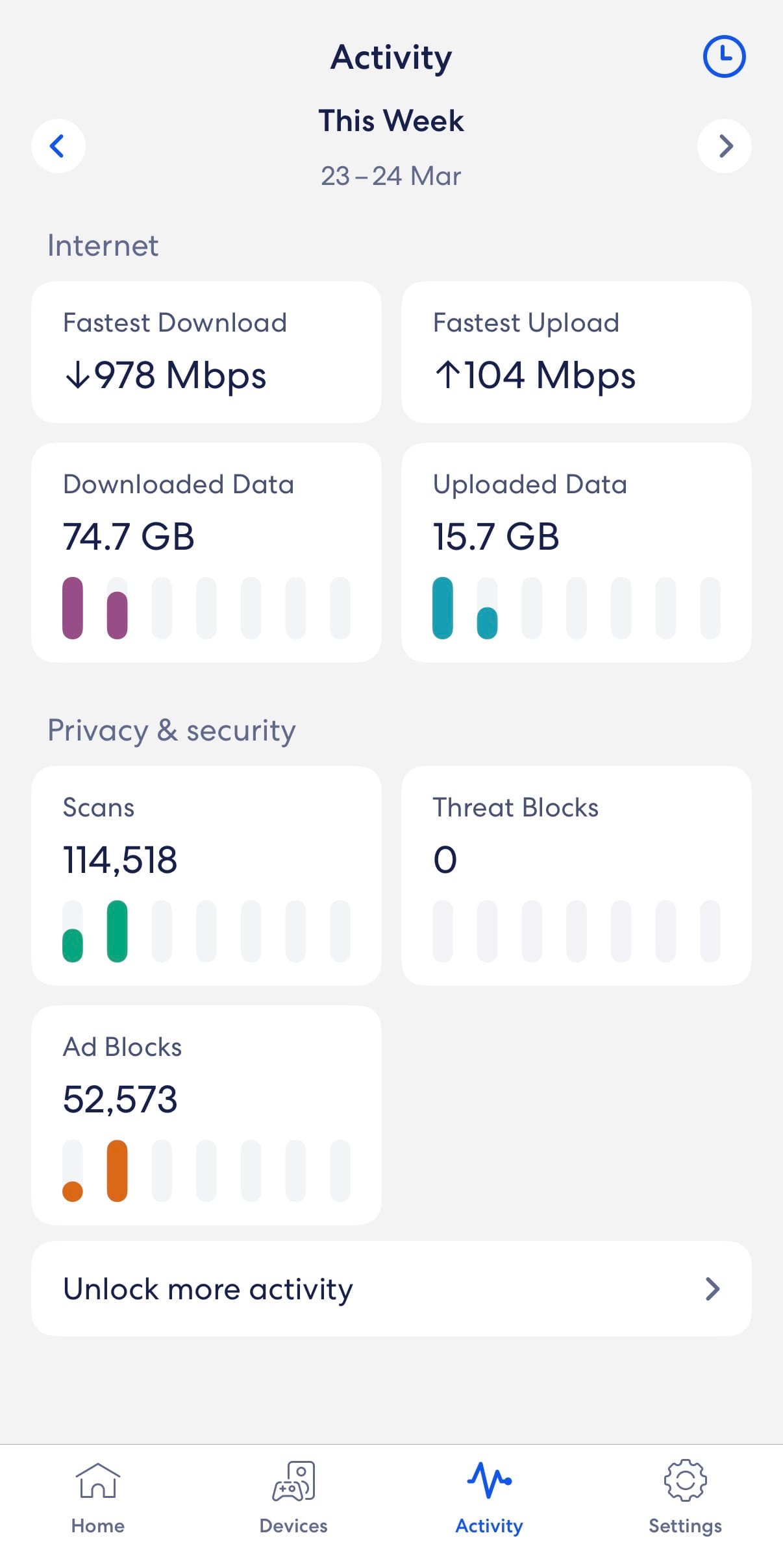
If something suddenly feels slow, it’s easy to open the app and see what else is using bandwidth.
More than once, I’ve discovered an iPad quietly updating apps in the background while something else on the network starts lagging.
That kind of visibility makes the system feel much easier to manage.
I also always enable the guest network, which creates a separate Wi-Fi connection for visitors without giving them access to smart home devices, shared files or the rest of the home network.
Like many apartments, mine doesn’t give me a lot of flexibility with router placement. I initially tucked the router inside the TV cabinet to keep things tidy, but after noticing it was getting quite warm, I moved it out into the open for better airflow and ventilation.
Worth Knowing
Mesh Wi-Fi systems use multiple nodes to improve coverage and reduce dead zones, but in smaller homes or apartments, a single Eero unit will often be enough.
One useful tip is to look at bundled ISP deals before buying outright.
Several Australian providers now offer Eero routers with NBN plans, sometimes subsidised or bundled with a complimentary Eero Plus subscription.
In my case, I actually bought the three-pack knowing my apartment only needed one unit, then split the bundle with two friends. That ended up being a much more affordable way for all of us to move to Wi-Fi 7.
Eero Plus is the optional subscription service, adding:
- Network-level ad blocking
- Security filtering
- Family controls
- Enhanced troubleshooting tools
- Hotspot backup
The hotspot backup feature is particularly clever. If your home internet drops out, you can connect a 4G or 5G hotspot and keep the entire network running without needing to reconnect every device individually.
The Eero Pro 7 also works well in smart homes.
It supports Matter and Thread, and can act as a Thread border router for compatible smart devices like sensors, switches and lights.
If you use Amazon Alexa, it can also function as a Zigbee hub for certain devices.
Limitations
The biggest limitation is the Ethernet ports.
There are only two.
One is used for your internet connection, which leaves just one spare wired port for devices like gaming consoles, TVs or hubs.
That can feel restrictive quickly.
If you need more wired ports, the easiest fix is to add a network switch, which can expand that single port into several more for around $50 AUD.
You can also add another Eero node, which gives you extra Ethernet ports and improves Wi-Fi coverage at the same time.
The other downside is price.
At over $500 for a single router, this sits firmly in premium territory.
And while Amazon’s Eero Max 7 solves some of these limitations with more ports, it jumps to $1,099.99 AUD for a single unit, which feels hard to justify for most homes.
Pricing
The Eero Pro 7 costs $529.99 AUD for a single unit, or $1,199.99 AUD for a three-pack.
That’s expensive compared to many standard routers, but ISP bundle deals and occasional sales can help reduce the cost.
If you live in an apartment or smaller home, a single unit will likely be enough.
Verdict
The Eero Pro 7 is a premium Wi-Fi 7 router that keeps up with faster NBN plans while staying refreshingly simple to manage.
Its biggest strength is the Eero app, which makes everyday network management far easier than traditional routers.
At $529.99 AUD, it’s not cheap, and the limited Ethernet ports may frustrate people with lots of wired devices.
But if you want fast, future-ready Wi-Fi without the usual router headaches, the Eero Pro 7 strikes a strong balance between performance, simplicity and everyday practicality.